Vignette: a complete project, from brief to signed binary
The full-scale example behind this whole guide: a multi-platform sticky-notes app designed, built, hosted and shipped by agents on the mini PC, in one night and one morning. With the real pitfalls and the real screenshots.
In this guide
- 01The starting point: a brief, not a prompt
- 02Technical choices: languages, architecture, and a trimmed stack
- 03The design: make it feel like real sticky notes
- 04Hosting: the exact circuit described in this guide
- 05Quality: unit tests, user testing, and memory
- 06Three agents, two machines, zero traveling keys
- 07The pitfalls, paid in full
- 08The difficulties, and the limits of the exercise
- 09What this example shows, and what it does not
- 10Frequently asked questions

Guide checked 3 months ago: some commands may have changed. Let us know if so.
In short
Vignette, a sticky-notes app docked to the edge of the screen, was designed, built, hosted and shipped by agents on this guide's mini PC, in one night and a morning at the end of August 2026. It runs online (web, macOS, Linux, Android), with a self-hosted Supabase backend, unit tests, 24 end-to-end scenarios and backups. The story shows what worked (a brief with mockups, human decisions taken early, several agent sessions checking each other) and what got stuck: never validate on an exit code, and a v0.1 is still a v0.1.
Do this first: Framing a project with an LLMRunning several agents together
This whole guide explains how to set up the machine, install the agents and frame the work. This page shows where it all leads: a real project, taken from the first message to a downloadable binary, on the very mini PC described here. The project, carried out at the end of August 2026, is called Vignette, a sticky-notes app that lives on the edge of your screen. You can open it, download it, read its code. Nothing is staged, and that is exactly what makes it worth dissecting.
The starting point: a brief, not a prompt
The evening brief is fuller than a single message: two mockups scribbled on a corner of paper and photographed with a phone, screenshots of an app whose look was appealing, a precise list of requirements (“premium, native, multi-platform, synced sharing, admin panel, French by default”), a request for name ideas, and a small competitive study: what exists, at what price, and above all what is missing. The finding fit in one sentence: note apps treat the screen as a document, none treats its edge as a place. That is the method from Framing a project with an LLM: show rather than describe, say what you want to get rather than how to code it.
The competitive study paid off again mid-project: from a paid, macOS-only competitor, two good ideas were spotted and adopted (keyboard shortcuts, a ten-second undo after deleting), and the opposite positioning asserted itself: multi-platform, open source, self-hostable. Looking at competitors is not copying; it is knowing where you stand.
Three human decisions were made before the first line of code: the name (Vignette, picked from proposals), Tauri v2 for the desktop app instead of Electron (binaries ten times lighter, the web app reused as is), and a self-hosted Supabase backend instead of a cloud service. The agent argued each option, the human decided, and those three choices held to the end.
Technical choices: languages, architecture, and a trimmed stack
Languages and architecture are all chosen so an agent finds its way fast. A pnpm monorepo in strict TypeScript end to end, with a core package holding the pure business model (deck ordering, status rules, Markdown imports), not a line of UI in it, tested with Vitest. Around it, separate apps: the web app in React 19 + Vite with Framer Motion for the springy animations, a static showcase site, the admin panel, a small zero-dependency Node admin API, and the native shell in Tauri v2, where Rust is limited to what the web cannot do (windows, tray, global shortcut, signed updates). A deliberate detail: no Tailwind, but a home-grown design system in CSS variables, because the project’s handwritten aesthetic fits no ready-made grid. And a single domain for everything: Caddy routes the app, the site, the admin and the API by path, which simplifies CORS, TLS and life.
Self-hosted Supabase usually ships about ten containers. Vignette runs six: Postgres, authentication (GoTrue), the REST API (PostgREST), realtime, a small zero-dependency Node admin API, and Caddy in front. Kong, Studio and analytics are gone. The result is about 450 MB of RAM, a reasonable share of a mini PC that hosts everything else too.
Security rests on Postgres Row Level Security: every table carries rules deciding, row by row, who reads and who writes. One account cannot read another’s notes, even by talking to the API directly. That is the kind of guarantee you verify rather than assume: a test suite replays ten invariants against the live instance every night (“an intruder cannot read”, “an invited editor cannot delete”), as recommended in Review, audit, secure.
The design: make it feel like real sticky notes
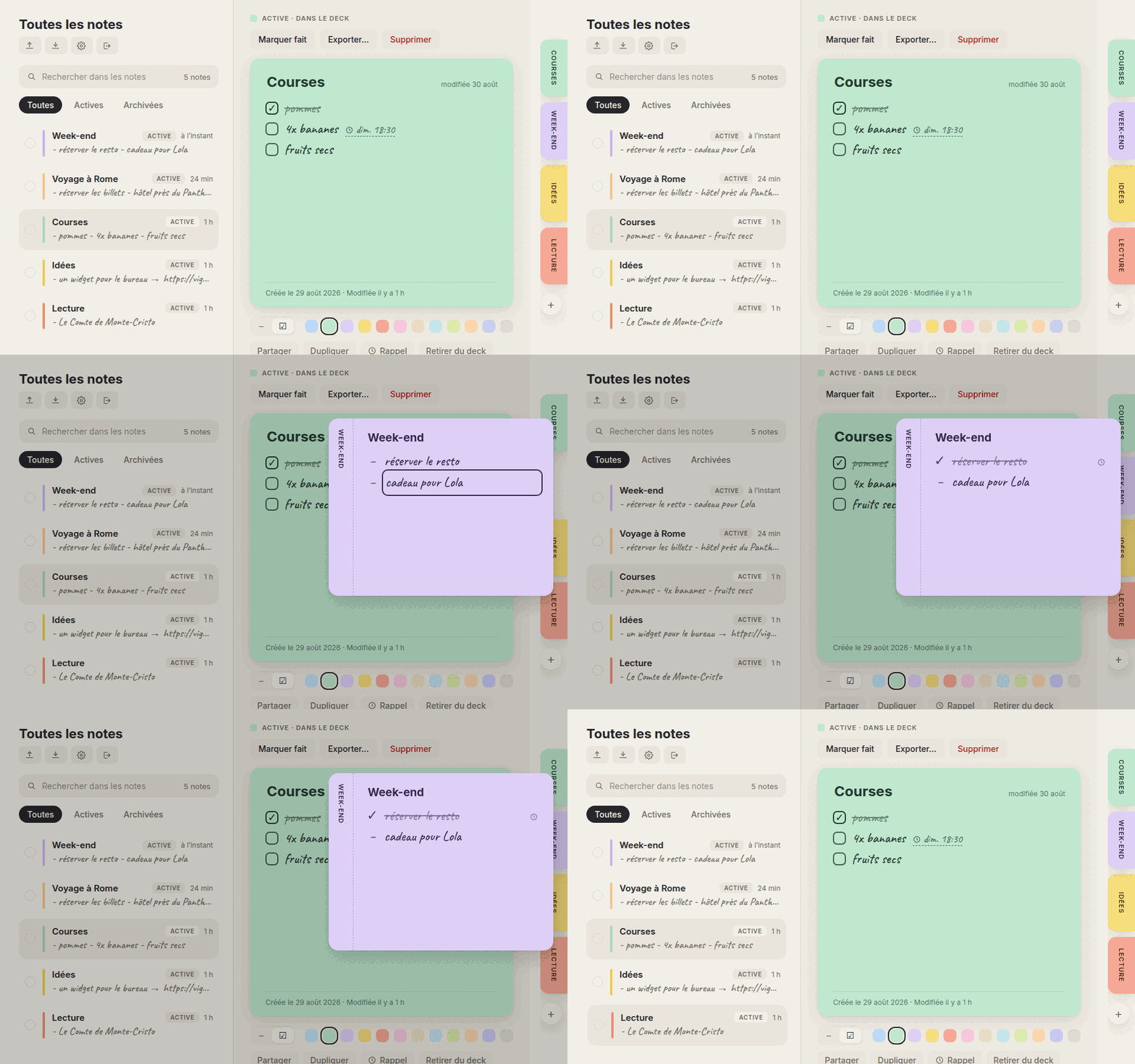
The visual stance came from the brief’s mockups: pastel tabs docked on the edge, handwriting (the Caveat font), springy animations, twelve colors. The golden rule, born from user feedback along the way: nothing ever peels away from the edge. A hovered tab grows into the page instead of detaching from the rim, an unfolded note stays welded to the screen. These are details, and they are what makes it believable.
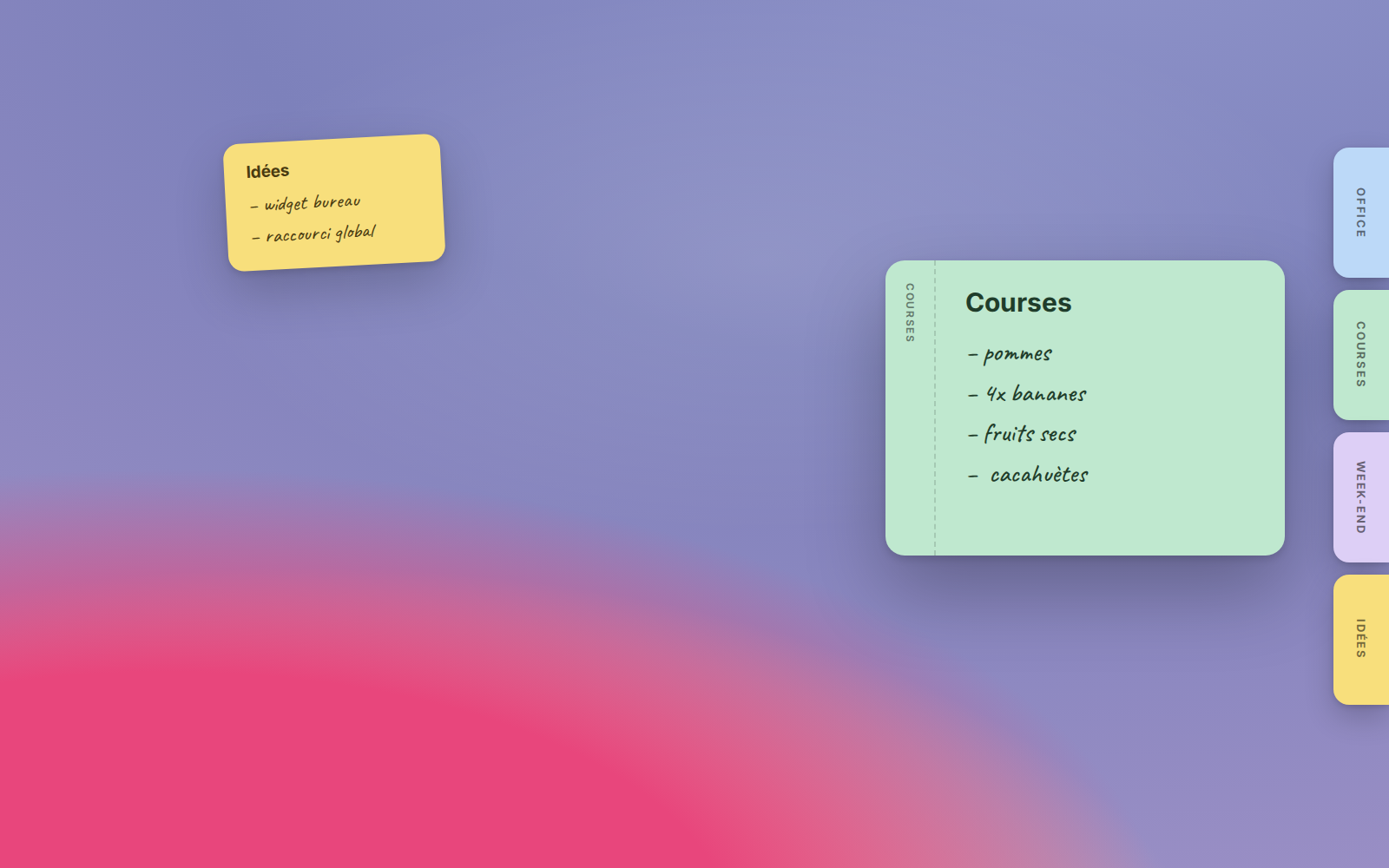
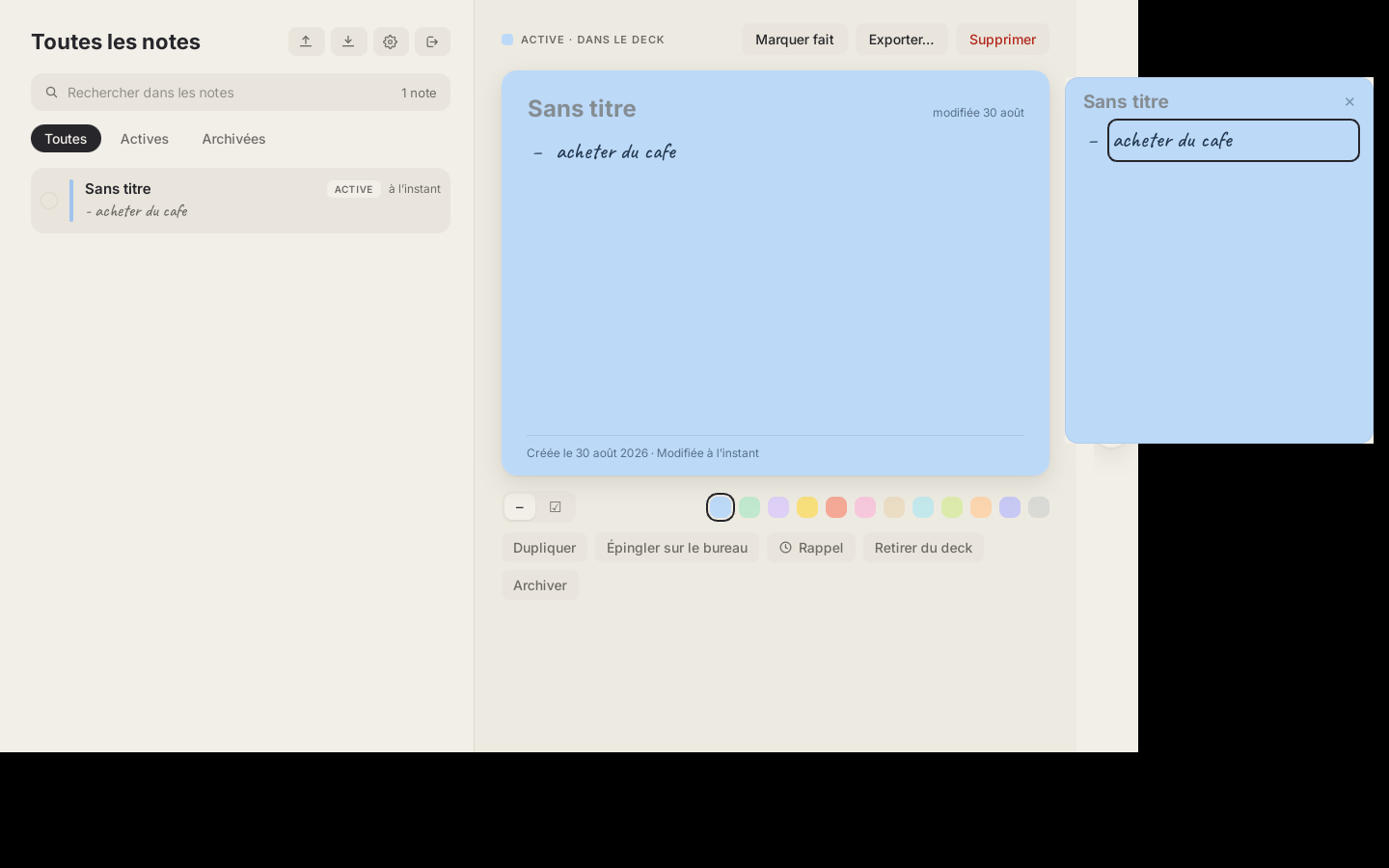
On desktop the concept goes all the way: a note can be pinned as a real borderless window, always on top, sitting on your desktop. And when it gets in the way, it tucks itself into a tab glued to the screen edge, like a real sticky note you nudge aside.
Hosting: the exact circuit described in this guide
A request follows the network chapter to the letter: the domain goes through a Cloudflare Tunnel (no port open on the router), lands on Caddy which routes to the right service, and Postgres is never exposed. Backups follow the doctrine of Git, GitHub and backups: a SQL dump every night, a copy on the NAS, a weekly mirror elsewhere. Monitoring alerts on Telegram within six hours if an invariant breaks, and the alarm itself was deliberately test-fired one morning at 8:35, because an alarm that never rang does not count.
Two hosting details worth copying:
0 of 2 steps done Your ticks stay in this browser.
-
SMTP is optional, truly
Without a mail server everything works: accounts created from the admin panel are active immediately, the “forgot password” link hides itself, and a lost password is replaced in two admin clicks. Requiring SMTP would have excluded half the people who want to self-host.
-
Apps connect with a URL, nothing else
Every instance exposes a small public endpoint describing its configuration. On first launch the native app asks “where do your notes live?”: the official instance, yours (paste the URL, it discovers the rest), or a fully local mode with no server at all.
Quality: unit tests, user testing, and memory
Three stacked nets guard the project, each catching what the others let through.
The first is classic: core’s unit tests (Vitest) lock the model down, and a 24-scenario end-to-end suite replays every journey in a real browser: sign-in, wrong password, creation, colors, deck, reminders, realtime sharing between two accounts, imports, exports, settings, mobile. One command, five minutes, verdict. Amusing and instructive: on its first run, its four failures were bugs in the tests, not in the app; an overly broad selector clicked “import” believing it clicked “export”. Tests need debugging too.
The second net is user testing, artisan edition: the user wakes up, tries everything, and sends impressions in bulk (“the icon is unreadable”, “the widget is empty”, “this menu is overloaded”, “things peel off weirdly”). Each remark is treated as a ticket: reproduced, fixed, re-tested, redeployed, often within ten minutes. Two of those remarks became design rules carved into the project’s memory. No automated suite replaces a human who finds a button ugly.
The third net is memory, in the sense of Memory files: an instructions file in the repo accumulating the pitfalls paid in full (with their fix, so they are never paid twice), and a persistent session memory holding decisions, user preferences and lessons. Security closes the march: a dedicated pass verified that no secret value lingers in git history (searching for segments of the real values, not variable names), that only the public discovery endpoint is exposed, that signups are closed server-side, and that baseline headers are set. Reviewed by agents, not by an external auditor: that nuance lives in the next section.
Three agents, two machines, zero traveling keys
The mini PC cannot build for macOS. A second agent session therefore runs on a MacBook, and the two talk as described in Running several agents together: the Mac one builds the app, drops the binary, announces its checksum; the mini PC one verifies the checksum, signs, publishes, updates the checksum file. Seven macOS builds went through that circuit in one night.
They were in fact not two but three. An orchestration session, always on, plays stage manager: it holds the sensitive credentials (the Cloudflare tunnel, where any change can break everything), sets up monitoring and probes, hands out tools and instructions (the cache purge token, each repo’s house rules), relays the user’s feedback when he writes elsewhere, and above all verifies what other sessions declare instead of taking their word for it. When the build session announced it had modified the personal website, the orchestrator went and checked the live page before filing the report. The builders build; it runs the stage.
The best moment of that collaboration: the key that signs updates never leaves the mini PC. When the Mac’s artifacts needed signing, the macOS session refused to carry a private key between machines and proposed something better: bring the files over and sign them locally, as a detached signature. The agent hardened the security procedure, not the other way around.
The pitfalls, paid in full
A project story that only tells the wins teaches you nothing. Three bugs from that night deserve the detour, because they share one moral:
- The white window. The first macOS build opened on a blank page: the native bundle’s asset paths were wrong. The build’s exit code, meanwhile, was flawless.
- The black icon. The command-line tool converting the SVG logo rendered its gradients as black, without a word of warning. The “bright yellow” icon shipped to the dock was a dark blob.
- The empty sticky note. The pinned window loaded its theme but never its data: the module that starts syncing was only called by the login screen, which that window never goes through. Two agents traced the same cause-and-effect chain independently before fixing it.
The moral, now a working rule between the two sessions: never trust an exit code. Launch the binary, look at the picture, measure pixel colors if you must. Three times that night, something that “had succeeded” did not work.
The difficulties, and the limits of the exercise
The story would be suspect without its rough edges. Here is what jammed, and what this example does not prove.
The difficulties first. The native cycle is heavy: every visible change in the apps means recompiling, re-signing and re-shipping binaries for three platforms; the night’s seven macOS builds are a symptom, not a feat. Remote proof has boundaries: over SSH, no agent can click inside a macOS window or see the menu bar, so some checks (the global shortcut, a link opening Safari) necessarily fall back to the human. The MacBook fell asleep three times mid-transfer before a bounded caffeinate settled it: the least prepared machine becomes everyone’s bottleneck. And the most instructive trap: an automated proof that tests the wrong scenario reassures falsely. The pinned note had its display proof, taken in local mode; the bug only lived in connected mode, and it took the user’s eye to see it.
Then the limits, stated plainly. “Four platforms in one night” produces a solid v0.1, not a matured product: no users under load, no proven scaling, accessibility still partial. As of 1 October 2026, iOS stops at the simulator (an Apple developer account is required), Windows waits for a machine to build on, widgets and peer-to-peer sync remain on the roadmap. Security was combed through by agents, not by an external auditor: RLS is tested nightly, but a human pentest is another matter entirely. Finally, nothing here replaces product vision: without the morning stream of feedback, the app would have stayed correct and slightly wrong everywhere. An agent amplifies a direction; it does not supply one.
What this example shows, and what it does not
In numbers: one night and one morning, four platforms online (web, macOS, Linux, Android) with signed binaries and built-in updates, an admin panel, backups, monitoring, and a 24-scenario test suite replaying every user journey in a browser.
What it does not show: a miracle. It took the prepared machine (this whole guide), a brief with mockups, human decisions at every fork, and a steady stream of morning feedback (“the icon is unreadable”, “the widget is empty”, “this menu is overloaded”), each one fixed, tested and redeployed within minutes. The agent does the work; the direction is yours. The full story, told from the human side, is at ulrichrozier.com/vignette.
All the commands in this guide
Frequently asked questions
What technologies was Vignette built with?
A pnpm monorepo in strict TypeScript, with a core package for the business model, tested with Vitest, a web app in React 19 and Vite, and a native shell in Tauri v2 where Rust is limited to what the web cannot do. The backend is a self-hosted Supabase trimmed to six containers: Postgres, authentication, the REST API, realtime, a small admin API in Node, and Caddy, which routes the app, the site, the admin and the API on a single domain.
Why choose Tauri over Electron for a desktop app?
For Vignette, Tauri v2 won for two reasons: binaries ten times lighter, and the web app reused as is. Rust is only used for what the web cannot do, such as windows, the system tray icon, the global shortcut and signed updates. The human made this call before the first line of code, and it held to the end.
How do you build a macOS app when you work on a Linux mini PC?
The mini PC cannot compile for macOS, so a second agent session ran on a MacBook. The Mac session built the app, dropped off the binary and announced its fingerprint; the mini PC session checked the fingerprint, signed, published and updated the checksums. The key that signs updates never left the mini PC: the files were brought back and signed there.
How do you stop one user from reading another user's data with Supabase?
Vignette relies on Postgres Row Level Security: every table carries rules that decide, row by row, who can read and who can write, even when someone talks directly to the API. That guarantee is checked: every night a test suite replays ten invariants against the real instance, such as 'an intruder cannot read' or 'an invited editor cannot delete'.
Do you need a mail server to self-host Vignette?
No, SMTP is optional. Without a mail server, accounts created from the back office are active immediately, the 'forgot password' link hides itself, and a lost password is replaced in two clicks by an administrator. Requiring it would have ruled out half the people who want to self-host.
Terms in this guide: Open source (vs open-weight)AgentMarkdownAPIShellContainerRAMRepository (repo)GitOrchestratorCloudflare TunnelTokenCLISSHLinux
Spotted a mistake?
A command stopped working, a price changed?
Tools change every month. Tell me what is wrong in this chapter and I will fix it and update its date.
